
Most candidates prepare JavaScript Interview by memorising basic syntax and common questions but Frontend Interviews focus on logical UI based Task instead of theory. One such popular , logical, and commonly asked problem is a Diagonal Matrix Interview Task, where you are asked to create an N×N grid or Matrix and highlight all diagonal cells when any cell is clicked.
This task designed to test your knowledge about DOM manipulation, event handling, and matrix logic—skills that interviewers use to quickly identify strong Frontend Developers. In this tutorial, you’ll learn how to solve this problem step by step using HTML, CSS, and Vanilla JavaScript, along with an optimized diagonal logic that works for any matrix size.
Video Preview Of Diagonal Matrix Interview Task
Understand The Problem Statement
Create an N × N matrix using HTML, CSS and JavaScript.
When the user clicks on any cell:
- The clicked cell should highlight.
- All diagonal cells (both left and right diagonals) should highlight.
- Previously highlighted cells should be cleared
The solution should work for any N × N size.
Let’s focus on coding to create N*N Matrix
We’ll use online codesandbox JavaScript environment to do this task you can use same or do it your local system.
<div id="matrix"></div>- In HTML body we just take a div with an id matrix
- we’ll render N*N matrix using JavaScript within this div element.
// Initialize & assign N
const N = 4;
//assign matrix element
const matrix = document.getElementById("matrix");
//Initialize an empty array
//we'll use to store all cells
const allRows = [];- Take an Integer constant value N. N could be anything.
- assign matrix variable
- we’ll use allRows Array to store all row wise cells so that we can perform Event Listener. You will understand more clearly end of this tutorial that why we take this Array.
const createMatrix = () => {
  for (let i = 0; i < N; i++) {
    const rowElements = [];
    const rowDiv = document.createElement("div");
    rowDiv.classList.add("rowcells");
    // const row = [];
    for (let j = 0; j < N; j++) {
      const cell = document.createElement("div");
      cell.classList.add("cell");

      cell.dataset.row = i;
      cell.dataset.col = j;

      rowDiv.appendChild(cell);
      rowElements.push(cell);
    }
    matrix.appendChild(rowDiv);
    allRows.push(rowElements);
  }
};- The
createMatrixfunction dynamically creates an N × N grid (matrix) using JavaScript. - It uses two nested loops to represent rows and columns of the matrix.
for (let i = 0; i < N; i++)- Iterates over rows of the matrix.
- Each iteration represents one row index.
const rowElements = []- Stores all the cell elements of the current row.
- Helps in accessing cells later using
rowandcolumnindexes.
const rowDiv = document.createElement("div")- Creates a container element for a single row.
rowDiv.classList.add("rowcells")- Adds a CSS class to style the row using flex layout.
for (let j = 0; j < N; j++)- Iterates over columns inside the current row.
document.createElement("div")- Creates an individual cell of the matrix.
cell.classList.add("cell")- Applies common styling such as size, border, and cursor
cell.dataset.row = i- Stores the row index inside the cell using HTML
data-*attributes.
- Stores the row index inside the cell using HTML
cell.dataset.col = j- Stores the column index inside the cell.
rowDiv.appendChild(cell)- Adds each cell into its respective row container.
rowElements.push(cell)- Stores the cell reference in the current row array.
matrix.appendChild(rowDiv)- Adds the completed row into the main matrix container.
allRows.push(rowElements)- Saves the row array into
allRows, creating a 2D array structure.
- Saves the row array into
const highlight = (row, col) => {
  for (let i = 0; i < N; i++) {
    for (let j = 0; j < N; j++) {
      if (i - j === row - col || i + j === row + col) {
        allRows[i][j].classList.add("highlight");
      }
    }
  }
}- The
highlight(row, col)function highlights all diagonal cells related to the clicked cell. rowandcolrepresent the row index and column index of the clicked cell.- Two nested loops are used to iterate through every cell of the N × N matrix.
- The outer loop (
i) moves through rows, and the inner loop (j) moves through columns. - For each cell, a logical check is applied to determine whether it lies on a diagonal.
- The condition
i - j === row - colidentifies cells on the primary diagonal (top-left to bottom-right). - The condition
i + j === row + colidentifies cells on the secondary diagonal (top-right to bottom-left). - If either condition is true, the current cell belongs to a diagonal of the clicked cell.
- The
highlightCSS class is added to those cells to visually emphasize them.Using CSS we’ll make it highlight by color change. - This approach avoids manual diagonal traversal and keeps the logic clean, readable, and scalable.
- The solution works for any N × N matrix size and is easy to explain in frontend interviews.
.cell {
  width: 50px;
  height: 50px;
  background-color: blue;
  margin: 10px;
  cursor: pointer;
}

.rowcells {
  display: flex;
}

.highlight {
  background-color: green;
}- each cell background color is blue but when on click highlight class will add to cell element it’ll change to green.
const clearHighLight = () => {
  allRows.flat().forEach((c) => {
    c.classList.remove("highlight");
  });
};- The
clearHighLightfunction is used to remove highlighting from all cells in the matrix. - It ensures that previous diagonal highlights are cleared before applying a new highlight.
allRows.flat()converts the 2D matrix array into a single flat array of cells.- This allows us to loop through every cell easily without nested loops.
forEachiterates over each cell in the matrix.c.classList.remove("highlight")removes the highlight CSS class from the cell.- This resets the matrix to its default visual state.
- Using
flat()keeps the logic simple, clean, and readable. - The function works efficiently for any N × N matrix size.
- Clearing highlights before applying new ones prevents overlapping or incorrect UI states during user interaction.
allRows.flat().forEach((c) => {
  c.addEventListener("click", () => {
    let row = parseInt(c.dataset.row);
    let col = parseInt(c.dataset.col);
    // console.log("row => ", row, " col => ", col);
    clearHighLight();
    highlight(row, col);
  });
});- This code attaches a click event listener to every cell in the matrix.
allRows.flat()converts the 2D matrix array into a single list of all cells.forEachloops through each cell one by one.c.addEventListener("click", ...)listens for a user click on the current cell.- When a cell is clicked, the callback function is executed.
c.dataset.rowretrieves the row index stored on the clicked cell.c.dataset.colretrieves the column index stored on the clicked cell.parseInt()converts these values from string to number.clearHighLight()is called first to remove any previous highlights.highlight(row, col)is then called to highlight the diagonals of the clicked cell.- This ensures only the current cell’s diagonals are highlighted at any time.
- Using
data-*attributes keeps the logic simple and avoids complex calculations. - The approach is scalable, clean, and interview-friendly.
Live Preview
Want to see how it’s works on real time?
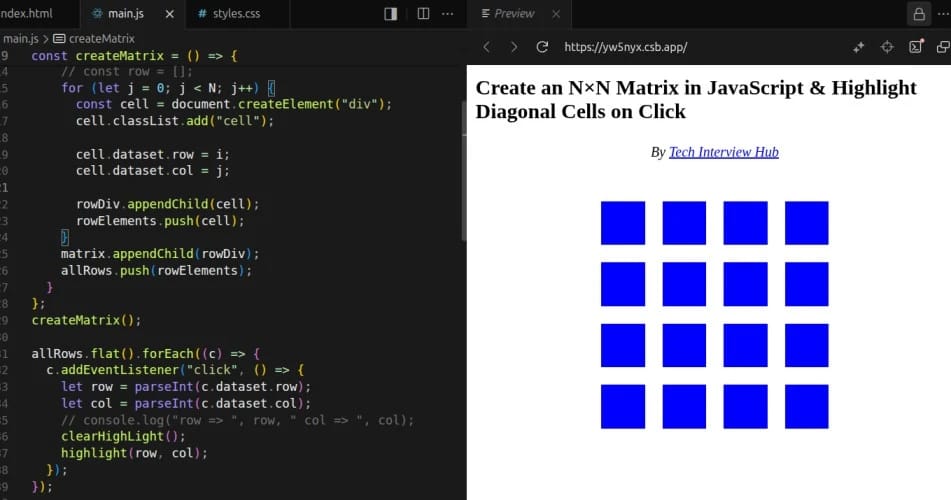
This live preview lets you:
- Click on any cell
- Instantly see diagonal cells highlighted
- Understand the logic visually, not just in code
Conclusion:
This JavaScript diagonal matrix interview task is a common Frontend Interview Problem because it evaluates real DOM manipulation and logical thinking, not memorized syntax. Problems like this help interviewers quickly understand how well a candidate can handle UI-based logic and event-driven behavior.
If you’re serious about improving your frontend interview skills, make sure you practice more JavaScript interview questions and DOM-based logical problems regularly. Exploring additional frontend machine-coding challenges will further strengthen your problem-solving approach and prepare you for real interview scenarios.
Thank You For Reading.

![Top CSS Interview Questions and Answers [Latest & Most Asked]](https://mlegnhsg05mg.i.optimole.com/cb:ir3L.9a8/w:1024/h:684/q:mauto/f:best/https://techinterviewhub.in/wp-content/uploads/2025/02/pexels-kampus-8439764-scaled.jpg)