
Many Frontend developers fail this simple Star Rating JavaScript interview question. Learn how to build a dynamic star rating system using HTML, CSS, and JavaScript with step-by-step explanation.
Why This Question Is Asked in Interviews?
If you are preparing for Frontend or FullStack Interviews, interviewer often asks:
Can you create a dynamic Star Rating system using JavaScript?
Interviewer test your JavaScript knowledge using this type of practical problem. It tests:
- DOM selection
- Event listeners
- Loops Data
- attributes
- Hover effects
- Logical thinking
Video preview of Simple Star Rating System:
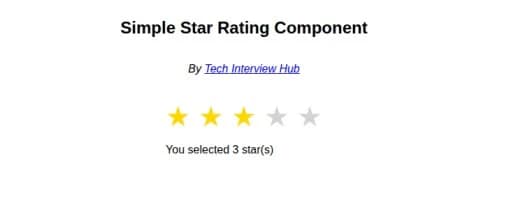
In this tutorial, we will build Five clickable stars, Hover effect, click to select rating, and reset previous selection.
Let’s focus on Coding:
At first , we have to write HTML structure to display stars
<div class="container">
<div class="rating">
<span class="star" data-value="1">★</span>
<span class="star" data-value="2">★</span>
<span class="star" data-value="3">★</span>
<span class="star" data-value="4">★</span>
<span class="star" data-value="5">★</span>
</div>
<p id="output"></p>
</div>- ★ => This Unicode star characters. You can Learn more about it on w3schools.
- data-value => we used this custom data attribute, This will help JavaScript to know which star number was clicked.
CSS Explanation
.container {
  margin: 20px 15px;
}

.rating {
  font-size: 40px;
}

.star {
  cursor: pointer;
  color: lightgray;
  transition: color 0.2s;
}

.star.active,
.star:hover,
.star:hover ~ star {
  color: gold;
}- cursor: pointer; ==> Makes stars clickable.
- color: lightgray; ==> Default star color.
- .star.active ==> When a star is selected, we add active class using JavaScript.
- transition: color 0.2s => Smooth color animation.
JavaScript For Simple Star Rating
const stars = document.querySelectorAll(".star");
const output = document.getElementById("output");
let currentRating = 0;


stars.forEach((star) => {
  star.addEventListener("click", () => {
    const val = parseInt(star.getAttribute("data-value"));
    // console.log(val);
    updateRating(val);
    output.textContent = `You selected ${val} star(s)`;
  });
});- querySelectorAll function Selects all stars and returns a NodeList.
- Initialize output variable to select paragraph which id is output.
- forEach => We loop through each star and write click logic using addEventListener(“click”)
- When a star is clicked:
- Get its value using getAttribute(“data-value”) JavaScript method.
- Calling Update rating
- Update UI using textContent
Core function updateRating(val) ~ Update Stars
const updateRating = (rating) => {
  stars.forEach((star) => {
    const val = parseInt(star.getAttribute("data-value"));
    if (val <= rating) {
      star.classList.add("active");
    } else {
      star.classList.remove("active");
    }
  });
};
Explanation using an Example :
Suppose you clicked on start = 3 then :
- Star 1 –> active
- Star 2 –> active
- Star 3 –> active
- Star 4 –>remove active
- Star 5 –> remove active
- This is done using: if (val <= rating)
Full JavaScript Code :-
const stars = document.querySelectorAll(".star");
const output = document.getElementById("output");
let currentRating = 0;

const updateRating = (rating) => {
  stars.forEach((star) => {
    const val = parseInt(star.getAttribute("data-value"));
    if (val <= rating) {
      star.classList.add("active");
    } else {
      star.classList.remove("active");
    }
  });
};

stars.forEach((star) => {
  star.addEventListener("click", () => {
    const val = parseInt(star.getAttribute("data-value"));
    // console.log(val);
    updateRating(val);
    output.textContent = `You selected ${val} star(s)`;
  });
});
Conclusion
If you cannot build this small component, interviewers assume:
- X Weak DOM knowledge
- X Weak event handling
- X Poor UI logic
But now you understand:
- data attributes
- Event listeners
- Class manipulation
- Dynamic UI updates
Practice more JavaScript Interview Questions here.
- Add half-star rating
- Store rating in localStorage
- Send rating to API

![Top CSS Interview Questions and Answers [Latest & Most Asked]](https://mlegnhsg05mg.i.optimole.com/cb:ir3L.9a8/w:1024/h:684/q:mauto/f:best/https://techinterviewhub.in/wp-content/uploads/2025/02/pexels-kampus-8439764-scaled.jpg)