
Are you a fresher preparing for a Frontend Developer interview? JavaScript is a core language that interviewers often test through questions and live coding rounds. So instead of relying on online EMI calculators, learn how to build one yourself using HTML, CSS, and JavaScript.
Stop using EMI Calculator JavaScript tools and build your own using HTML, CSS, and JavaScript. Learn DOM, events, and logic for interviews.
Why Should You Learn to Build an EMI Calculator?
When a Hiring Manager sits across from you and says build an “EMI Calculator”, They will test your key knowledge of JavaScript.
They will test :-
- Type Casting
- DOM Handiling
- Event Management
- Error Handiling
An EMI Calculator is one of the most complete beginner-to-intermediate JavaScript projects you can build — and it is small enough to finish in one sitting.
EMI Formula:
EMI = [P × R × (1+R)^N] / [(1+R)^N - 1]
Where:
- P = Principal Loan Amount
- R = Monthly Interest Rate (Annual Rate ÷ 12 ÷ 100)
- N = Loan Tenure in Months
HTML Code To Build An EMI Calculator
<div class="container">
      <h2>EMI Calculator</h2>
      <p>
        <i>By <a href="https://techinterviewhub.in/">Tech Interview Hub</a></i>
      </p>

      <input type="number" id="amount" placeholder="Loan Amount" />
      <input type="number" id="rate" placeholder="Interest Rate (%)" />
      <input type="number" id="years" placeholder="Loan Tenure (Years)" />

      <button id="calculateBtn">Calculate EMI</button>

      <h3 id="result"></h3>
      <h3 id="result_total"></h3>
      <h3 id="interest_total"></h3>
    </div>
DOM Structure Setup :-
- input fields -> Take user input data such as amount, rate of interest, time in years
- id -> Used to access HTML elements in JavaScript
- button -> On Click the Button It’ll Triggers calculation
- Heading with result ID -> Displays EMI
- Heading with result_total ID -> Display Total amount that you have to pay
- Heading with interest_total ID -> Display Total Interest amount that you have to pay
CSS Code For Better Look
body {
  font-family: Arial;
  background: #f4f4f4;
  display: flex;
  justify-content: center;
  align-items: center;
  height: 100vh;
}

.container {
  background: white;
  padding: 20px;
  border-radius: 10px;
  width: 500px;
  box-shadow: 0 0 10px rgba(0, 0, 0, 0.1);
  display: flex;
  flex-direction: column;
  justify-content: center;
  align-items: center;
}

input,
button {
  width: 80%;
  padding: 10px;
  margin: 10px 0;
  /* border: 1px sold blue; */
  border-radius: 10px;
}

button {
  background: #007bff;
  color: white;
  border: none;
  cursor: pointer;
}

button:hover {
  background: #0056b3;
}
CSS Key Points:-
- display: flex , justify-content, align-items are used to Centering layout. You can Learn More about at W3schools
- box-shadow used to give Modern card type look as you can see above.
- border-radius -> Smooth UI
- :hover -> Better user experience when hovering buttoon.
- Clean UI = better impression in Interviews
JavaScript Code To Build An EMI Calculator
This is the most important part of the question because hiring managers want to evaluate your JavaScript skills—how you build logic, handle the DOM, and trigger events to display the correct output for users.
If you can’t create a perfect UI with CSS, that’s okay. But if your JavaScript logic is weak, it can cost you the interview. So let’s focus on getting this part right.
document.getElementById("calculateBtn").addEventListener("click", function () {
  let P = Number(document.getElementById("amount").value);
  let rate = Number(document.getElementById("rate").value);
  let years = Number(document.getElementById("years").value);

  if (P <= 0 || rate <= 0 || years <= 0) {
    document.getElementById("result").innerText = "Please enter valid values";
    return;
  }

  let r = rate / 12 / 100;
  let n = years * 12;

  let EMI = (P * r * Math.pow(1 + r, n)) / (Math.pow(1 + r, n) - 1);

  document.getElementById("result").innerText =
    "Monthly EMI: ₹" + EMI.toFixed(2);

  document.getElementById("result_total").innerText =
    "Total You Will Pay: ₹" + (EMI * n).toFixed(2);

  document.getElementById("interest_total").innerText =
    "Total Interest: ₹" + (EMI * n - P).toFixed(2);
});
Important key points:
- addEventListener(“click”, function () {}) -> It will trigger when user click the Button Element
- document.getElementById(“amount”).value -> Fetch User Input from the input elements
- Number(…) -> when we fetch the data it always present in string format. To convert them from string to number we this built-in function.
- if (P <= 0 || rate <= 0 || years <= 0) -> It’ll prevent Invalid Inputs.
- let EMI = (P * r * Math.pow(1 + r, n)) / (Math.pow(1 + r, n) – 1);
- We have write the formul in mathematical way in JavaScript to calculate EMI.
- Math.pow(1 + r, n) -> It’s do power calculation. Handles compound Interest.
- EMI.toFixed(2) -> It Limits decimal data to 2 digits
Output
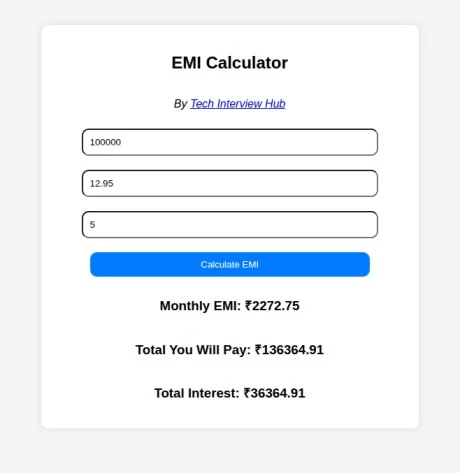
Using this JavaScript logic, we calculate and display the monthly EMI, the total payable amount (principal + interest), and the total interest. This helps users clearly understand and verify their loan details.
However, our main goal is not just the result—it’s to help you understand how the JavaScript logic works behind the scenes to perform these calculations.
You can explore the complete working code on CodeSandbox.
Conclusion
Building an EMI calculator is more than just a UI project — it’s a complete JavaScript fundamentals test.
Follow our more JavaScript Interview Questions to learn:
- DOM manipulation
- Event-driven programming
- Mathematical problem-solving
- Clean UI design
Instead of depending on online tools, building your own tool gives you real confidence in interviews.

![Top CSS Interview Questions and Answers [Latest & Most Asked]](https://mlegnhsg05mg.i.optimole.com/cb:ir3L.9a8/w:1024/h:684/q:mauto/f:best/https://techinterviewhub.in/wp-content/uploads/2025/02/pexels-kampus-8439764-scaled.jpg)